Kaba — Own the AI. Train the experts.
Kaba Labs — the harness and lab for AI you own

Own the AI.
Train the experts.

Kaba is the harness that runs AI on hardware you control, and the lab where it gets better from your own work. For builders training their own models, and for companies that need every agent, dataset, and decision under their control.

Download for {{ osLabel }} Kaba for enterprise
Personal — free, open source, one binary Enterprise — self-hosted, policy-governed, auditable
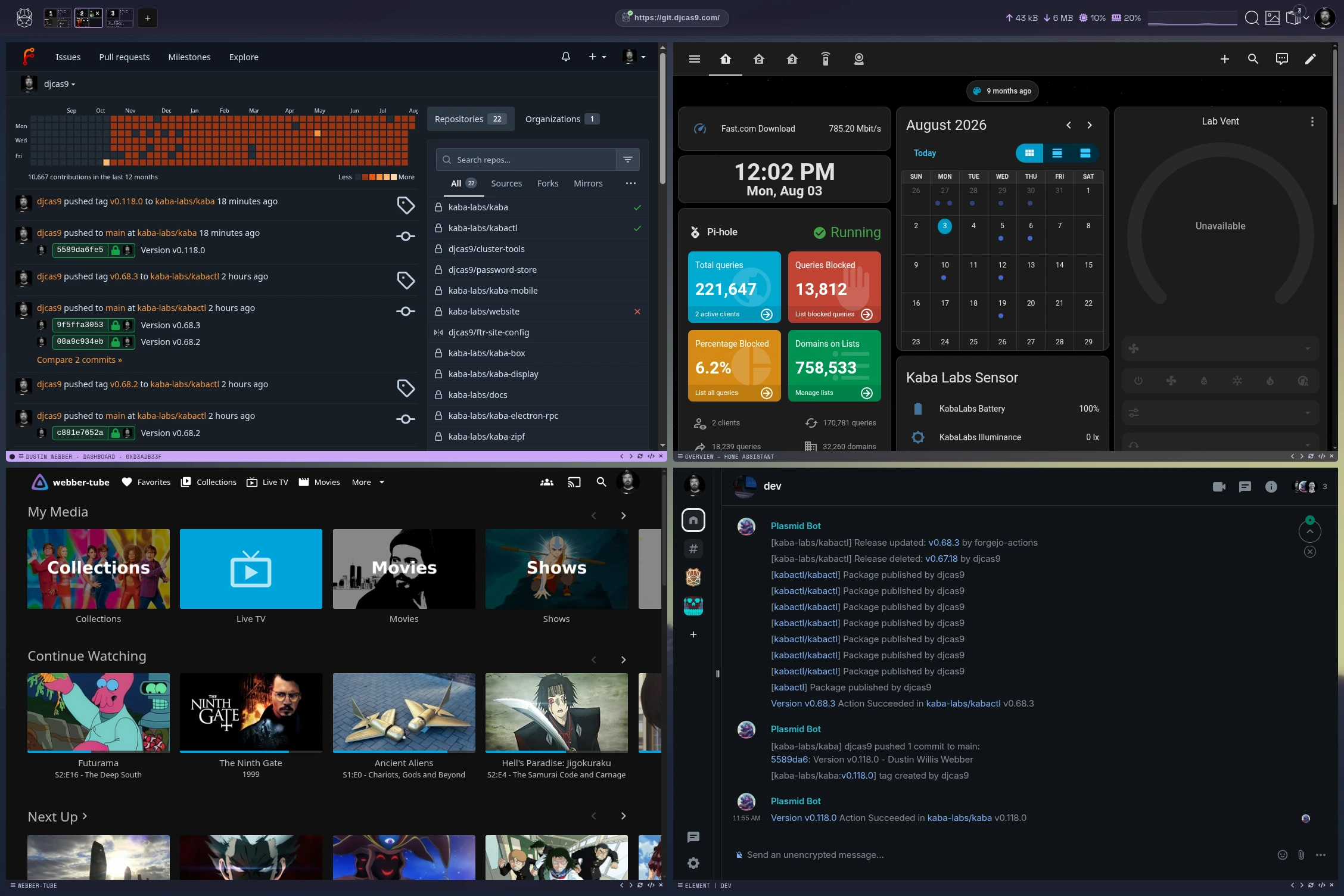
Hippocampus — every page, command, and file, observed on your device Encrypted at rest Ready to become training data
01

Why Kaba Exists

AI changed what computing is for. The browser is still one of the most important places work happens, but it is no longer the only one: models now gather context, take action, and learn across the browser, the terminal, your files, and every connection between your devices. That shift is why Kaba exists.

Most AI runs on models nobody using it owns. Prompts, documents, and the judgment of your best people flow into someone else's system, and none of it compounds for you.

{{ g.tag }}
{{ g.title }}
{{ g.problem }}
→{{ g.answer }}
02

A Harness To Run It. A Lab To Improve It.

Architecture docs ↗
HARNESS — the runtime
Where agents run, under your rules.
Tool loop over any local model
Hooks, subagents, and peers. Every exec in a gVisor sandbox.
Policy gate inside the loop
Each model call and tool step is checked before it runs.
Memory, encrypted at rest
Written from observed context, readable only under policy.
A private mesh
Your devices and servers join over iroh. No cloud broker, no open ports.
LAB — where it improves
Where your work becomes better models.
Trajectories captured
Every run is checkpointed. Rewind it, replay it, or train on it.
Datasets curated automatically
Observations are embedded, extracted, and cleaned into a dataset pool.
LoRA experts trained on your data
Locally, or pushed to a peer with a bigger GPU.
RL and evals before deploy
Adapters improve on your memory graph and ship with an eval trail.
The loop runs continuously and stays on your hardware.
01
Run
Agents work in the harness
02
Observe
Trajectories and memories
03
Curate
Policy-scrubbed datasets
04
Train
LoRA and RL on your data
05
Evaluate
Gate on evals and sign-off
06
Deploy
Back into the harness ↺

Kaba fundamentals: why it is designed this way

Understanding AI control and risk starts with a way to capture AI and its risk. That is why one harness does so much. A browser, a terminal, a file manager, a private mesh, and a policy engine look like a lot for one product, and each piece is there for a reason.

01
Context for adapters that last
Missing context makes broken models. A model trained on one side of how people work has to guess the rest, and those guesses aren't useful in any situation. Because the harness sees browsing, commands, and files together, adapters learn from the whole picture, keep real domain knowledge, and build on the same foundation with every new version.
02
Security and policy where data starts
Controls only work at the point data is created. With every surface inside the harness, policy applies to each page, command, and file before anything reaches a model or leaves the device.
03
Training data without contamination
An adapter is only as good as what it learns from. The harness keeps provenance attached to every record, separates people, teams, and sources, and stops untrusted or unapproved content before it enters a dataset.
04
No trade-offs on the tools
Capture can't cost the tools their edge. Each embedded tool keeps its own features, performance, and security: the browser and terminal run at native speed, every exec is sandboxed in gVisor, data is encrypted at rest, and the mesh exposes no open ports.
03

Two Ways In

PERSONAL
Be your own lab.
Your laptop, desktop, and home lab become one private AI that learns from how you work. Build datasets from your own context, train LoRA experts, and list them on the marketplace.
—One binary, free and open source
—Any local model, any hardware
—Train on a peer's GPU from your laptop
—Sell, lease, or merge the experts you build
Explore Kaba Personal →
ENTERPRISE
AI your company controls, end to end.
Deploy agents on your own infrastructure with your policies, data, and people in every loop. Keep shadow AI and outside threats out, and keep your expertise in.
—Self-hosted on Kubernetes, Nomad, or bare metal
—Steered by your people, your ontology, or both
—Policies enforced inside every agent call
—A company model built from your teams' adapters
Explore Kaba Enterprise →

Your Hardware. Your Model.
Start Training Your Attention.

FOR BUILDERS
Install in one line.
$ curl -fsSL https://kaba.ai/install.sh | sh
Download for {{ osLabel }} free · open source
FOR ENTERPRISE
Bring Kaba to your company.
A self-hosted pilot on your infrastructure, with your policies and approvers in place from day one.
Kaba Personal

Be your own lab.

Your laptop, desktop, and home lab become one private AI that learns from how you work. Build datasets from your own context, train LoRA experts on your own hardware, and own every one of them. Free and open source. Local and encrypted by default.

Download for {{ osLabel }} Read the docs
01

The Client Is The Lab

The client docs ↗

Using models is now the norm. With Kaba, build datasets, train with RL, and turn telemetry into fuel. Be your own lab.

Full stack, end-to-end context — the reason the models get good.
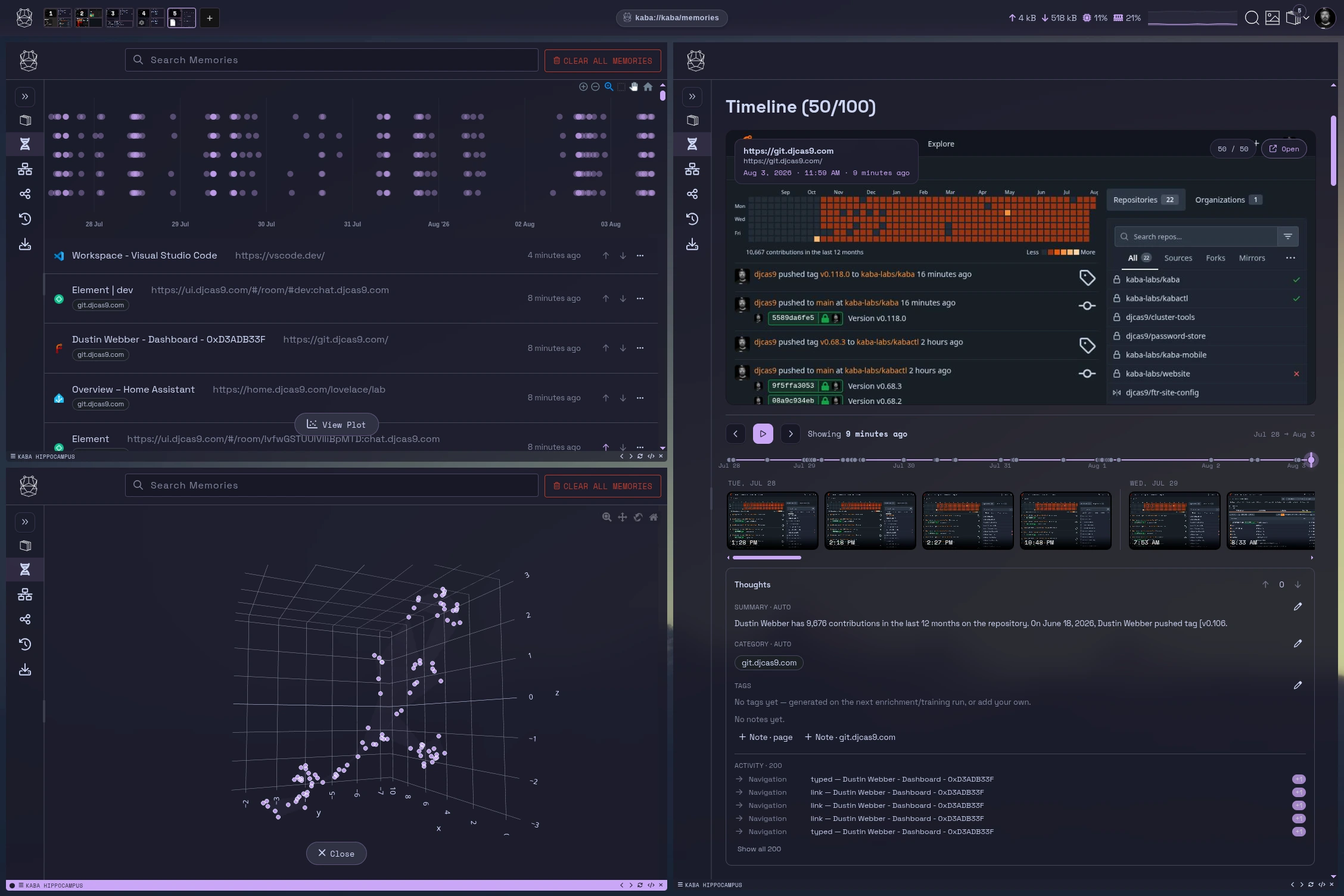
No other tool, app, or model has your full context — just the prompts, or just the data within that app. Kaba's client encapsulates your flow across the entire stack, observing the ground truth of how, when, and why you work. Every observation stays local, encrypted at rest.
LoRA yours browser terminal files harness
Navigation
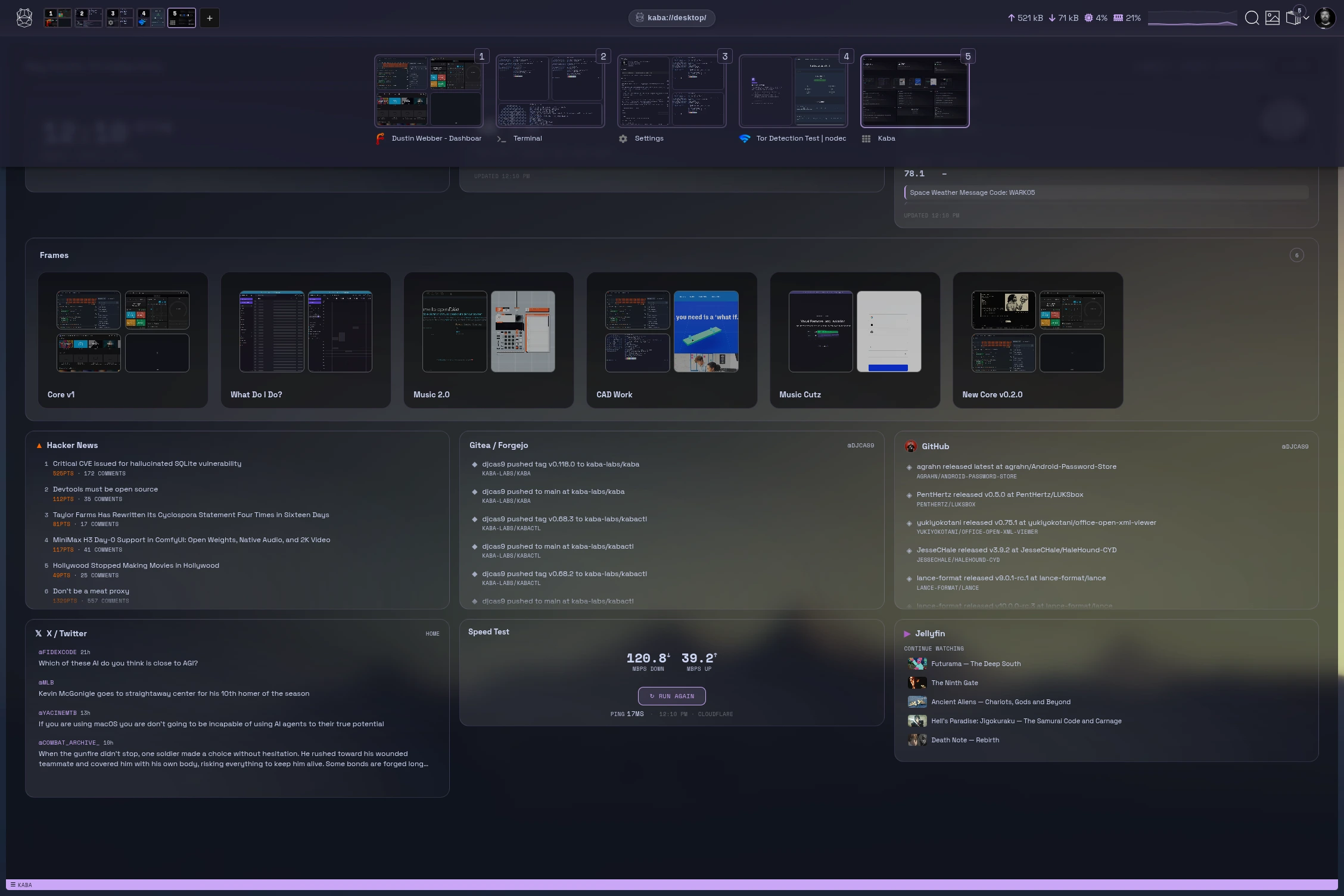
kaba://desktop/
Navigation
Every peer, model, memory, and run in one workspace. Jump back into frames where you left off.
Model harness
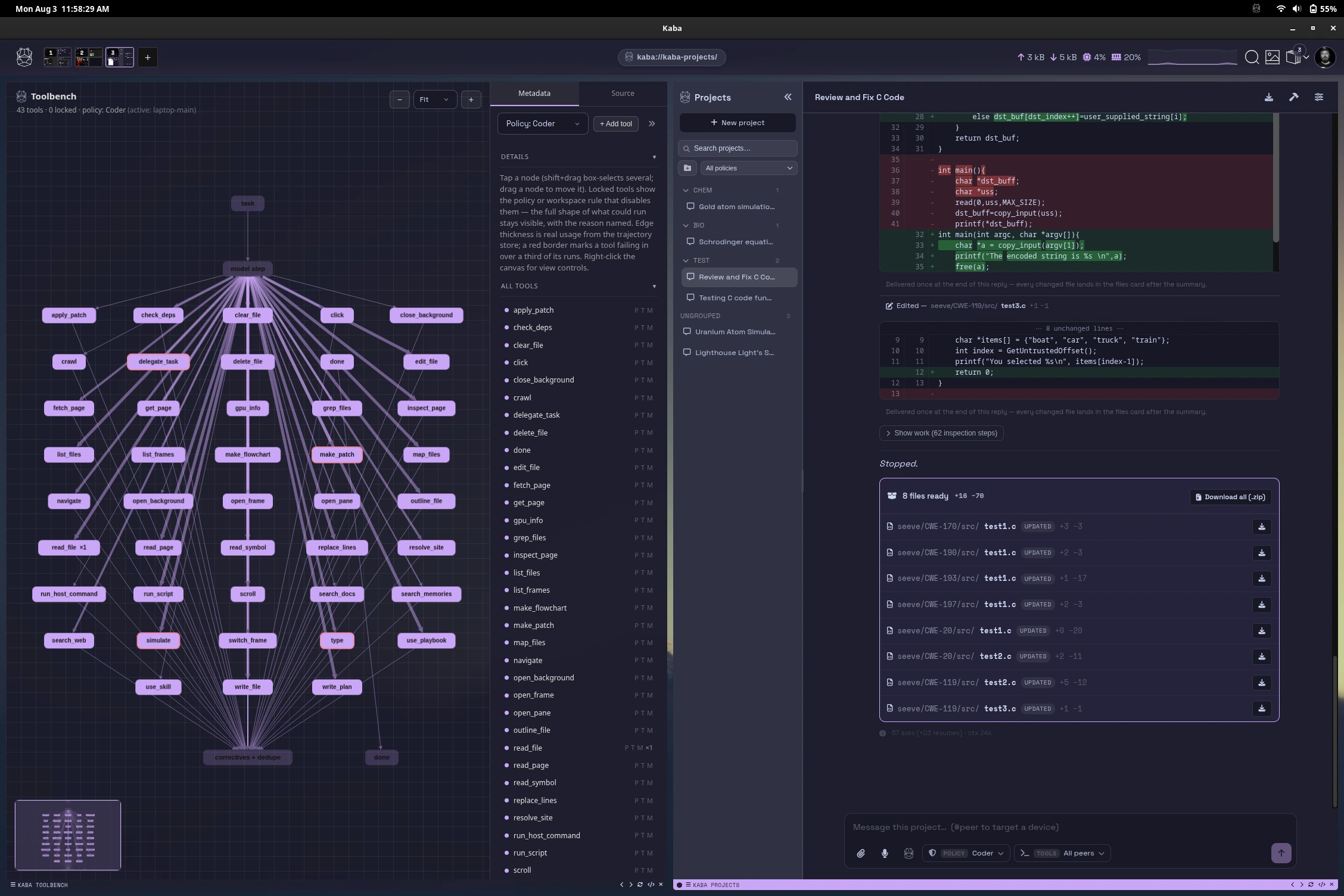
harness://
Model harness and lab
Chat, tool loops, and adapters over any local model. Every exchange becomes trajectory data that sharpens the next LoRA.
{{ tile.title }}
{{ tile.placeholder }}
{{ tile.tag }}
{{ tile.title }}
{{ tile.desc }}
02

How Kaba Works

Protocols docs ↗
// THE MESH — peers, streams, tokens
laptop laptop.kaba gpu-tower gpu-tower.kaba k8s-node homelab.kaba phone phone.kaba tor egress kaba/infer/v1 kaba/train/v1 kaba/fs/v1 kaba/sync/v1 kaba/pty/v1
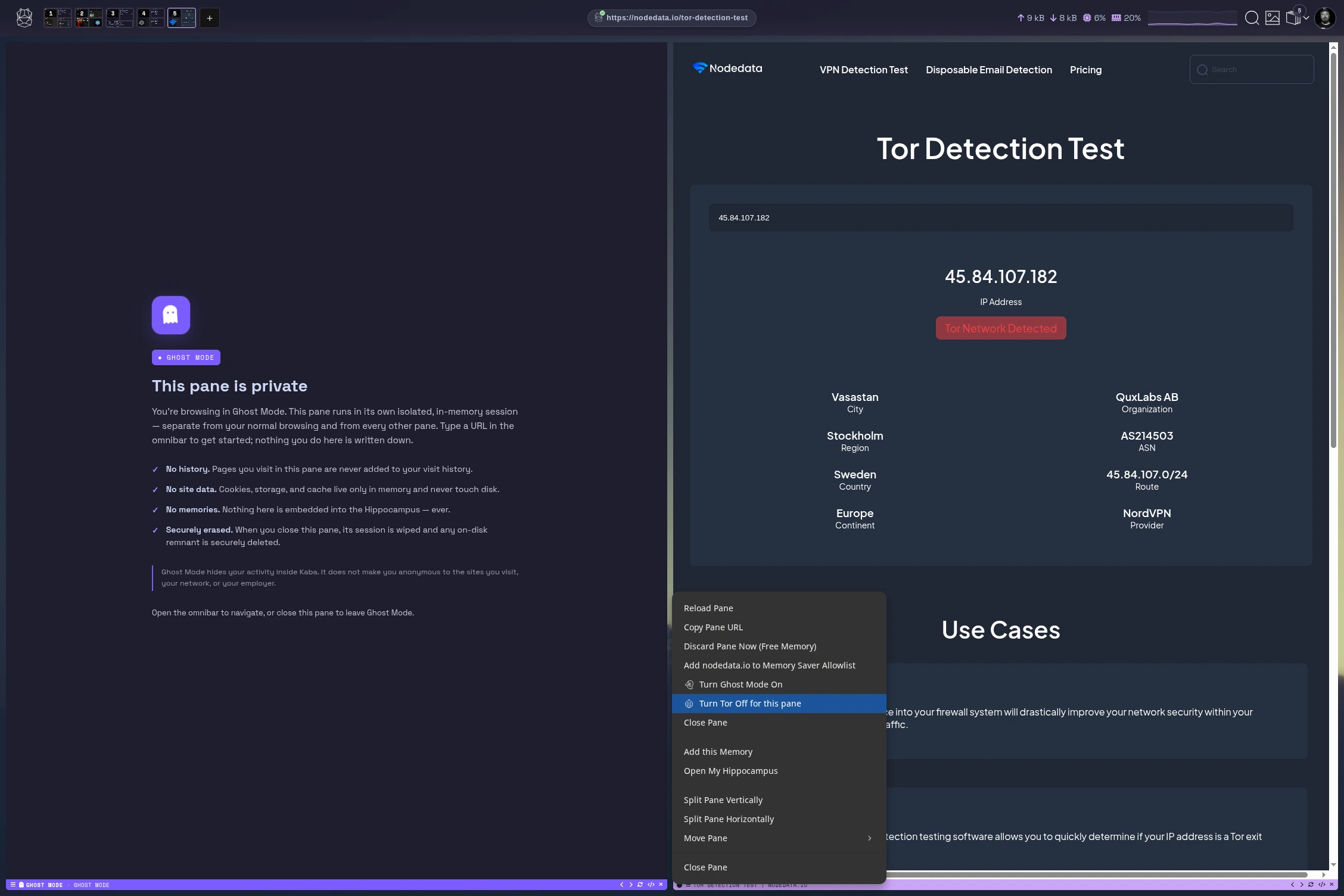
Every stream is an encrypted QUIC connection between peers you own — addressed by key-derived .kaba names over iroh, no DNS, no CA. Prompt goes out on kaba/infer/v1, tokens stream back. Anything that leaves the mesh can exit over Tor — and adapter selection is the peer's policy, the requester never chooses.
kabactl — zsh
$ kabactl cluster join --ticket kaba-intro
✓ gpu-tower joined · kaba/cluster/v1
$ kabactl infer --peer gpu-tower
▸ streaming tokens · kaba/infer/v1
$ kabactl train lora --dataset memories/
▸ checkpoint 3/12 · trajectory logged
▸ policy: local-only · encrypted at rest
// THE LEARNING LOOP — observe → memory → RL → adapter
observe attention memory memcrypt RL trajectory LoRA adapter yours, versioned
Memories are written autonomously from observed context, encrypted before rest. RL runs over memories and trajectories; the output is a LoRA adapter that is yours — sell, buy, trade, breed.
toolloop
// THE TOOL LOOP
01 prompt → plan 02 tool call → gVisor container 03 observe → checkpoint 04 subagents → peer GPUs 05 hooks gate every edit
03

The Marketplace — An Open Market For Experts

Marketplace docs ↗
Every adapter you train is an expert. Experts are assets.
The LoRAs you build, the datasets you curate, the tools you design — list them, price them, sell or lease them. And because experts are composable, buyers don't just run yours: they breed it with their own — merging adapters into offspring with genuinely new capability. Unique thought, compounding.
rust-dev .lora · yours sec-audit .lora · leased offspring safe-rust.lora bred, versioned, yours to list
market::adapters
Experts for sale or lease
List a LoRA with its manifest and eval trail. Sell it outright or lease it by the epoch. Buyers verify provenance before a single token streams.
market::datasets
Datasets, policy-scrubbed
Curated training sets are built from your work and released only through the policy gate. What you sell is exactly what you chose to share.
market::tools
Tools for the loop
Ship the tools you design for your experts — sandboxed, gVisor-contained, ready to drop into anyone's tool loop.
expert::breed
Breed for new capability
Combine experts — yours with bought, bought with leased. Merged adapters inherit from both lines; the offspring is a new asset you can list.
04

Mobile — Your Cluster In Your Pocket

Mobile docs ↗
All the benefits of the client in an on-the-go package. Never walk around with your laptop open again.
chatFull bi-directional conversations with any model on the cluster — pick a peer, pick an expert, talk.
remoteA remote for every peer in the mesh — see what's running, start and stop jobs from anywhere.
manageDevices and policies in your pocket — approve peers, edit rules, watch the mesh react live.
05

kabactl — The Whole Mesh From One Prompt

Kabactl docs ↗
kabactl
Everything the client does, scriptable.
Join clusters, stream inference, push training jobs, inspect memories, edit policies — from any shell, over the same encrypted streams. Pipe it, cron it, put it in CI.
$ kabactl --help
cluster   join, leave, status, ticket
infer     stream tokens from any peer
train     lora build · push · import
mem       ls, show, forget — your memories
policy    edit the rules the mesh enforces
fs        browse and stream peer files
$
stdin | kabactl
Composable
Reads stdin, writes JSON. Every command pipes into the next. Your mesh speaks Unix.
--peer anywhere
Peer-addressed
Target any device you own by name. LAN, tailnet, or across the world — the stream finds it and connects you directly.
same policy::gate
Same rules apply
The CLI goes through the identical policy gate as the client. No backdoor, no service account, no exceptions.
06

Built On

Internals docs ↗
{{ qa.q }}
{{ qa.a }}

Your Hardware. Your Model.
Start Training Your Attention.

KABA PERSONAL
Install in one line.
$ curl -fsSL https://kaba.ai/install.sh | sh
Download for {{ osLabel }} free · open source
Kaba Enterprise

AI your company controls,
end to end.

Deploy agents on your own infrastructure with your people, ontology, policies, and expertise in every loop. Accelerate adoption without turning speed into insider risk.

Talk to us Read the docs
01

Not VDI. The Controls Of VDI, Built For AI.

Virtual desktop infrastructure (VDI) runs each employee's desktop as a virtual machine in a central data center and streams the screen to whatever device they use. It solved the last shift: data stayed in the data center, and IT could govern every desktop from one place, at the cost of speed. AI agents can't work that way. They make thousands of small decisions, and every round trip to a VM or a remote API slows each one down. Local, instant AI needs a new way to run it: central control, distributed compute.

Kaba is not VDI. Nothing is virtualized and no screen is streamed. Work runs natively on each device, and fleet management gives IT the same controls VDI provided: enrollment, central policy, access rules, updates, audit, and remote wipe of keys and data.

VDI · LAST ERA
KABA · AI ERA
Where work runs
Virtual machines in a data center, streamed to the endpoint
On the device, or the nearest peer in your private mesh
Speed
Every action crosses the network and waits on a shared host
Inference and tool calls run locally, with no network round trip
Control
Achieved by putting everything in one place
Central policy that travels with every workload
Data
Copied into the data center to be governed
Stays where it was created, encrypted, with provenance attached
Fleet
Images and golden VMs managed centrally
Devices enrolled and grouped; policies, models, and adapters pushed per group
AN OPERATING SYSTEM FOR AI

In practice, Kaba works like an operating system.

An operating system decides what runs, what it can access, and how it talks to the outside world. Kaba does the same for AI across every device in the fleet, through the harness and its private network.

Processes
Agents and tool loops, each sandboxed in gVisor
Permissions
Policies on what can infer, train, read, and leave
Users and roles
People, approvers, and ontology rules that steer agents
File system
Encrypted memories, datasets, and adapters with provenance
Networking
Private iroh mesh with key-derived .kaba names, no open ports
Package manager
Models, adapters, and tools, versioned and pushed per fleet group
02

Enterprise In The Loop

Enterprise docs ↗

Every deployment runs through three loops: your people and ontology, your policies, and your expertise. They are built into the runtime, not sold as add-ons.

01
People and ontology steer
Agents act inside the structure of your business. Steer them with people, with your ontology, or both: approvers sign off on sensitive actions, and the ontology defines the entities, relationships, and rules every agent step must respect. Each step is checkpointed as a trajectory, so any run can be replayed and audited.
02
Policy inside every call
Policies run in the daemon, not in a dashboard: who can infer, what can train, where data rests, which tools may touch the network. Nothing leaves unless a policy allows it, and unsanctioned AI has nowhere to run.
03
Expertise stays in the company
The judgment of your people is captured as LoRA adapters trained on their own work. Adapters are versioned, owned by you, and never shared with a model vendor.
approvals — legal-ops.kaba
awaiting sign-off
contracts-agent wants to
Send a redline summary to counsel at a partner firm
policylegal.external-share · 1 approver
ontologyContract › Counterparty · rule passed
data3 docs · confidential
expertlegal-redline.lora · v14
sandboxgvisor · network held
trajectory #48213 · 6 steps checkpointed
03

Run The Whole Fleet From One Place

Every laptop, workstation, server, and edge device running Kaba is part of one fleet. Manage it, search it, and train across it, with every result feeding the company model.

fleet::manage
Fleet management
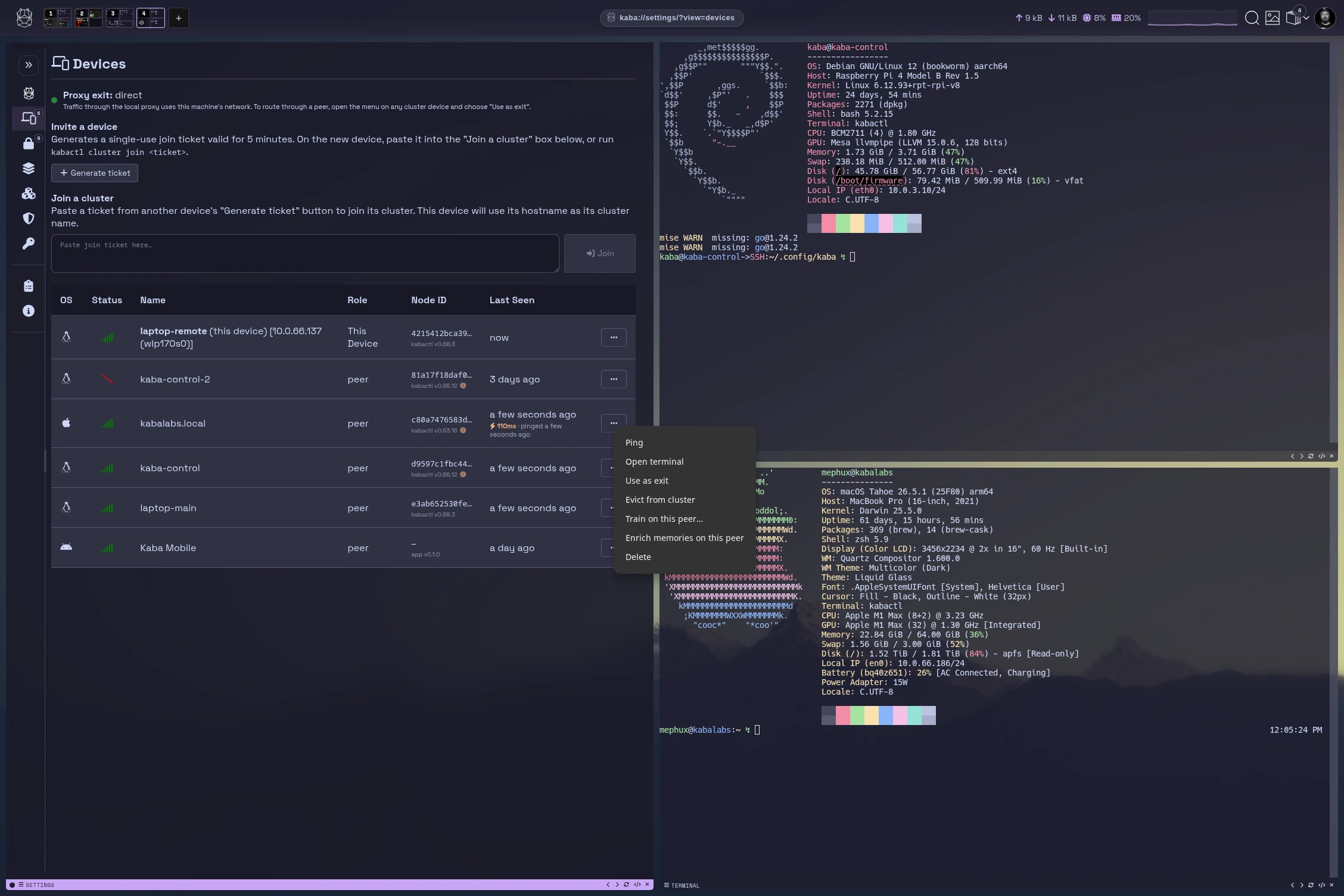
Enroll devices with join tickets and group them by team, site, or business unit. Push policies, models, and adapters to each group, and see health, versions, and GPU capacity for every peer in one view.
fleet::search
Fleet search
Search memories, documents, trajectories, and adapters across every device without copying data into a central index. Queries run where the data lives and return only what policy lets the requester see.
fleet::train
Fleet training
Schedule jobs across idle GPUs in the fleet. Go beyond LoRA: distill larger models into smaller ones, run RL on trajectories and approvals, tune the router, and evaluate every candidate before it ships.
One pipeline from fleet activity to the company's mixture-of-experts model.
01
Collect
Trajectories and approvals from every device
02
Curate
Policy-scrubbed, provenance attached
03
Train
LoRA, distillation, RL, router tuning
04
Evaluate
Evals and sign-off gate every release
05
Roll out
New experts to fleet groups, back into the MoE ↺
04

A Model That Builds Itself From Your People

Each team trains adapters on its own work. Kaba routes across them as a mixture of experts, so the company model improves every time someone does their job well.

Legallegal-redline.loraEngineeringinfra-runbook.loraSalesdeal-desk.loraSupporttier2-triage.loraFinanceclose-checklist.lorarouterMoEcompanyexpertpeopleadapters they trainacme.kaba
router::learn
Routing learns from outcomes
Trajectories and approvals tell the router which expert answers best, per task and per team.
adapter::manifest
Every expert is accountable
Adapters ship with a manifest and eval trail: who trained it, on what, and how it scored.
expert::merge
Retire, retrain, or merge
Swap experts in and out without retraining the base model. Merge two adapters into a new one.
05

Speed Without Understanding Is An Insider Threat

Security docs ↗

The fastest way to adopt AI is to let everyone use it. When nobody understands where data goes, what agents can touch, or which models learn from it, that speed becomes the biggest risk inside your company. Kaba lets you accelerate with the risk visible and governed from the first deployment.

policy::gate
Sanctioned by default
Every model call and tool step routes through policy. RAG, models, adapters, and memories are encrypted at rest. Unapproved endpoints are blocked at the daemon.
gvisor
Every tool sandboxed
Each exec runs in a gVisor container. Network access is a policy decision, granted per step.
kaba://*.kaba
Sovereign service exposure
Expose anything under a .kaba domain. Publish APIs, dashboards, data, or content behind a key-derived .kaba name. Access is either public or restricted to your chosen peers. Iroh/QUIC direct connect means no DNS lookup, no CA, no open ports.
run::anywhere
Platform-agnostic, default local
Linux as first-class citizen with native macOS and Windows support. Runs on desktops, servers, headless IoT boards, or ESP32 microcontrollers. Same binary, any edge. No cloud dependency, no vendor lock-in.
helm install kaba
Deploys on your platform
Kubernetes, Nomad, or any container cluster you run. Carve the mesh per user, per business unit, per org: same binary, scaled on your systems.
trajectory::audit
Verifiable by construction
Open source binary you can inspect, plus a trajectory for every run. GDPR and CCPA answers you can prove. Runs fully air-gapped when required.
06

You Can't Control AI Cost Until You Control AI Use

For most companies, AI spend is growing faster than anyone can track. Seats, API tokens, and cloud GPUs are billed by different vendors to different teams.

Cost and risk are the same problem. When you can't see who is using which model on what data, you can't secure it and you can't budget for it. Kaba puts use under control first, and cost control follows.

cost::small-models
Small models on your systems
Most work doesn't need a frontier model. Small models with your own adapters run on hardware you already own, with no per-token bill, and every request that stays in-house is one less exposure.
cost::gpu-pool
Dedicated GPU boxes, one meter
Put GPU capacity in a few dedicated machines and share them across the fleet over the mesh. Spend and utilization are monitored at a single point instead of spread across vendors and teams.
cost::policy
Budgets enforced as policy
Set who can use which models, how much compute each team gets, and when to fall back to a smaller model. Limits are enforced in the runtime, not reconciled from invoices at the end of the month.
cost::trajectory
Every run accounted for
Each run is recorded with the model, the hardware it ran on, and the team it served. Cost is attributed from the same trajectories you use for audit.
{{ qa.q }}
{{ qa.a }}

Your Hardware. Your Model.
Start Training Your Attention.

KABA ENTERPRISE
Bring Kaba to your company.
A self-hosted pilot on your infrastructure, with your policies and approvers in place from day one.
About Kaba Labs

Security people who don't want to slow you down.

We've spent decades in enterprise security. We've also watched security teams become the reason new technology stalls.

We don't think that trade-off is necessary. You can move fast, understand your risk, and protect your data at the same time. Kaba is how we're proving it.

Our team has worked incident response at GE CIRT, done R&D at Mandiant, and built security companies that solved hard enterprise problems. Kaba is the latest of those, and not the last.

Based in
Boston, MA
Background
GE CIRT · Mandiant R&D · security company founders
Building
The harness and lab for AI you own
Accessibility is a Human right. Your data. Your model. Your experience. Real-time and continuously verified.
© Kaba Labs, Inc 2026
DOWNLOAD DOCS ABOUT SOURCE PRIVACY
COMING SOON
[click anywhere to close]
Screenshot
[click anywhere to close]