Kaba — AI that runs on your own devices

Be your own
Big Tech.

The AI, the cloud and the marketplace,
running on hardware you already own.
Connected when you choose.
Working when you can’t.

Free · open source · one binary
Kaba Labs — the harness and lab for intelligence you own
⤢ Fullscreen
Harness — browser, terminal, files, models Mesh — your devices, peer to peer Offline — works without the internet Self-hosting — your apps, kept running

Every connection is a way in. What leaks stays online forever. What are you getting for the risk?

Why now

What stays offline stays safe.

What goes online stays there forever, and with AI the risk is immediate: anything exposed can be found and used in minutes. Security used to depend on making attacks expensive, and that cost has dropped close to zero. People avoid conflict zones in the real world. Staying off the open internet is the same choice, and with Kaba you give up nothing to make it, at home or at work.

Attacks get cheaper every month
Models that write code also write exploits. Finding and using a vulnerability takes less skill and less time than it did a year ago.
Hosted services hold the data
A provider can investigate a breach and tell you what was taken. It can’t undo it, and it holds the same kind of data for millions of other people.
Assistants collect the most personal data
Memories, private questions and unfinished projects are what people share with assistants. A local model gives the same help without handing them over.
No public address
Kaba devices connect directly over iroh and verify each other by key. There is nothing to scan and no port to open on your router.
The moat is disappearing
Writing software is cheap and largely automated now. Open-source alternatives improve every month, and the reasons to rent the basics are going away.
Self-hosting stopped being a chore
Running your own apps used to mean updates, backups and late-night fixes. Kaba now handles that work around the clock.
Features

The features of the big AI labs, on your own hardware.

The tools people pay hosted services for, running on computers you already have.

Chat and assistants
Ask, write, summarize and plan with models running on your devices.
Coding agent
Reads your repo, runs code in a sandbox and fixes what it finds.
Memory
Remembers your projects and preferences, encrypted on your own disks.
Research and browsing
Searches the web and your saved pages, and shows what it read.
Voice
Talk to it and hear it answer, with speech handled on-device.
Image understanding
Reads photos, screenshots, scans and handwriting.
Files and documents
Works across documents, spreadsheets and PDFs where they already live.
Mesh across your devices
Laptops, phones, desktops and servers share models and files directly.
Offline mode
When the internet drops, everything local keeps working.
Self-hosted services
Run open-source apps like Jellyfin and Nextcloud on your hardware. Kaba keeps them updated and running, and reachable from any of your devices.
Ownership

AI lets you be your own provider, and your own marketplace.

The services people rent exist because building and running software used to be expensive. That cost is gone. You can provide those services for yourself, and trade what you make directly with other people.

Your own provider
Run what you used to rent.
Models, memory, files, media and office apps on hardware you own, kept running by Kaba. No account with a platform, no terms that change under you.
Your own marketplace
Sell what you build, directly.
The experts you train, the datasets you curate and the tools you design are assets. List, sell or lease them to other people over the mesh, with no platform in the middle.
How the marketplace works →
Harness

One place to run every model.

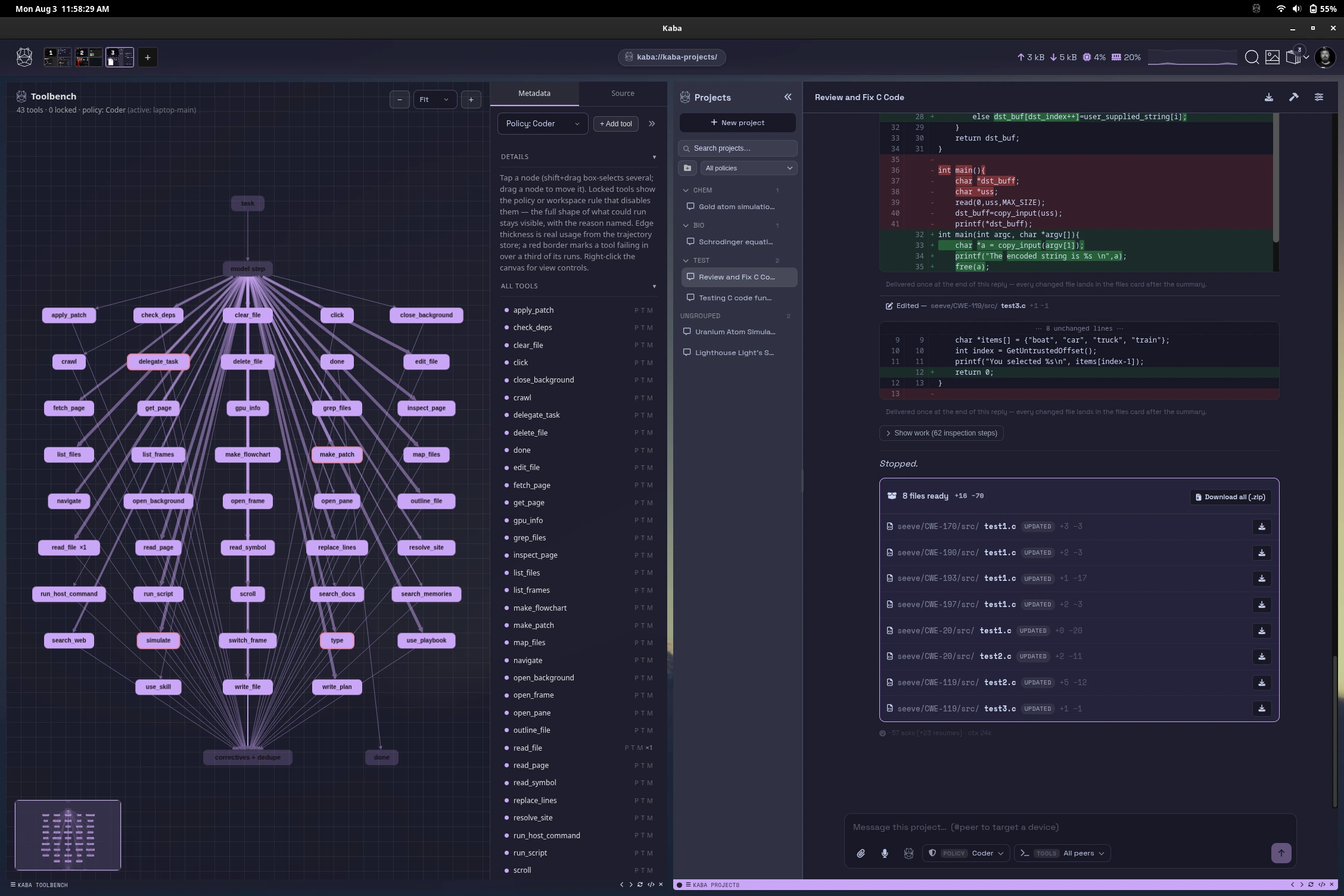
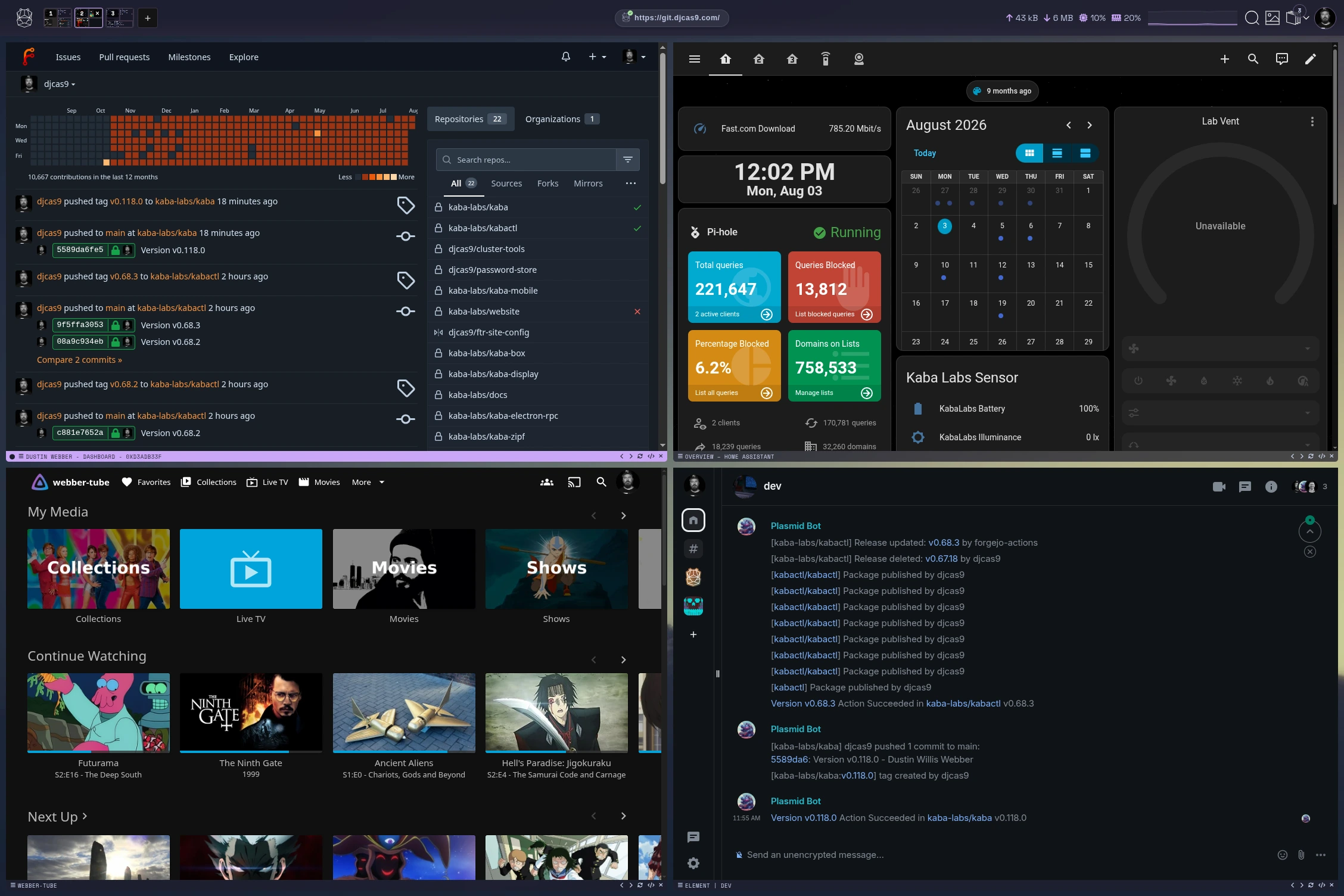
Browser, terminal, files, and models in a single harness on your devices. Kaba does the work itself, in the same windows you do. Policy checks every step before it runs.

Kaba harness
Memory

It remembers what matters to you.

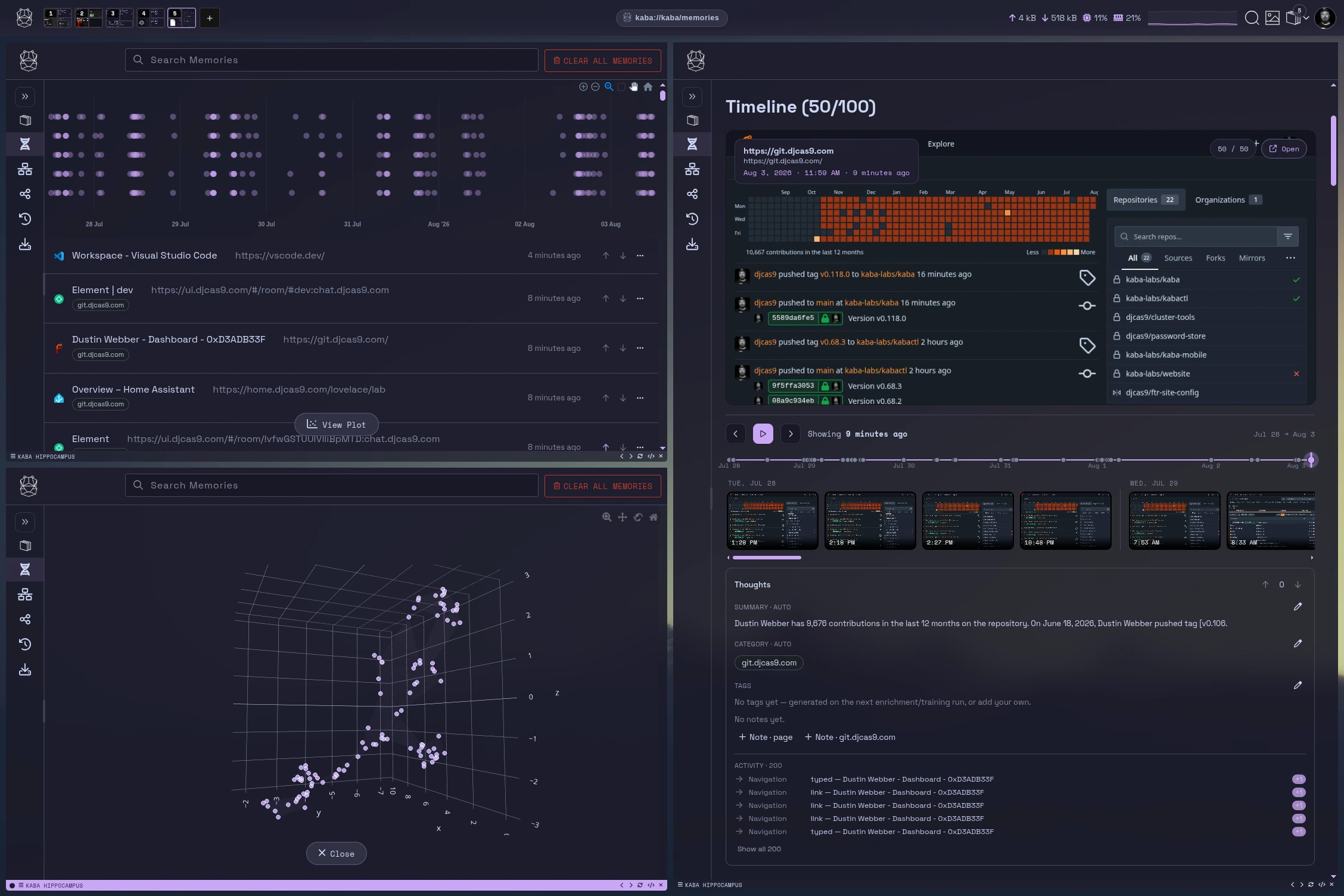
Everything you see and do becomes private, encrypted memory, curated into clean datasets automatically.

Kaba memories
Lab

Then it gets better at it.

Train expert models on your own context, on your own GPUs or a peer’s. Every version is evaluated before it ships.

Kaba remote compute
Everyday

Intelligence off.
Everything else on.

Models and memory are one part of Kaba, and every bit of it can be switched off. What stays is the best way you have ever used the internet: private, peer to peer, and built with features the big browsers will never ship.

Kaba browser
A private browser
Your browsing stays on your device. No ad model, no telemetry, nothing sold.
Ghost Mode
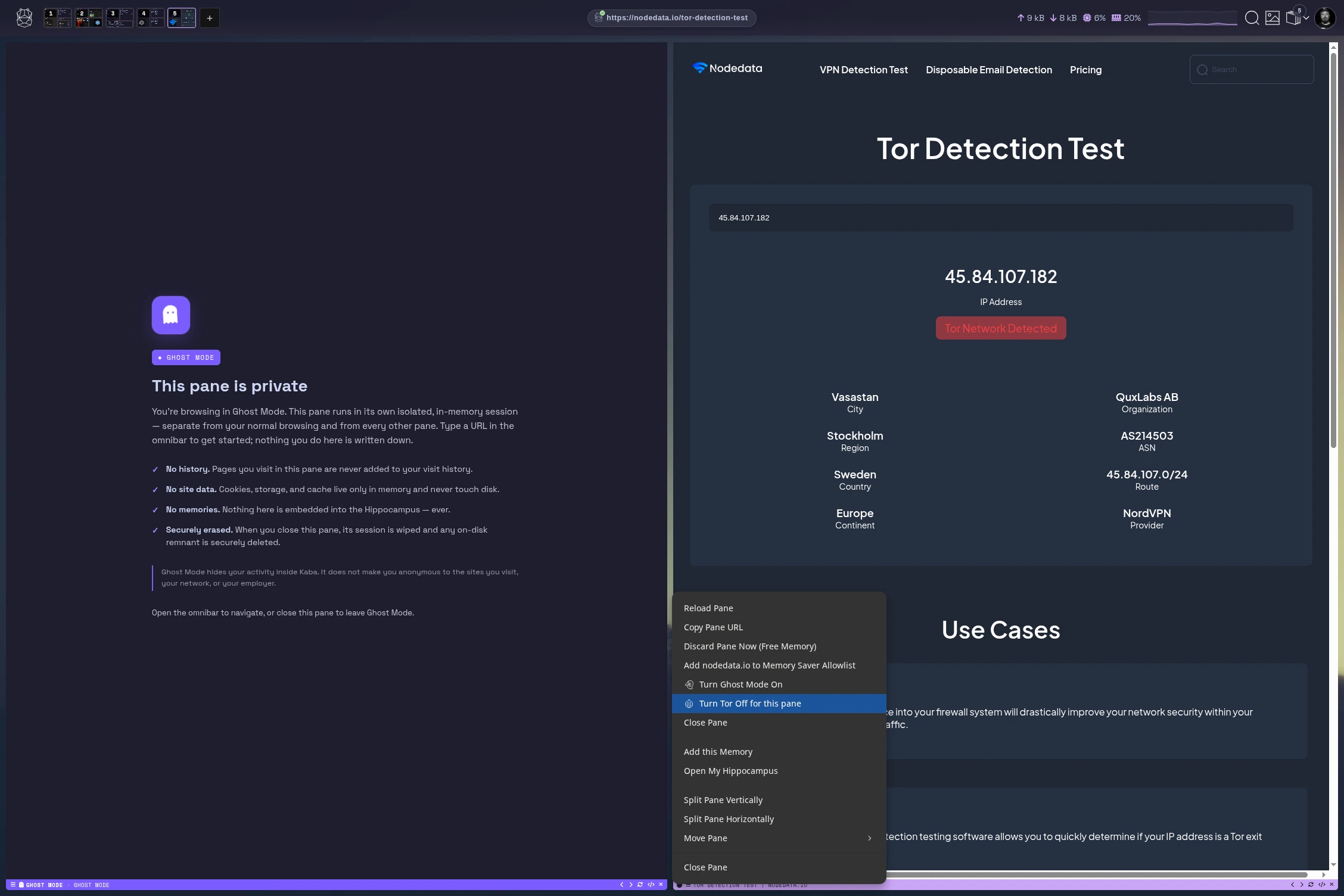
Ghost Mode and Tor, per pane
Open any pane over Tor or in Ghost Mode, right beside your everyday tabs.
A mesh VPN, built in
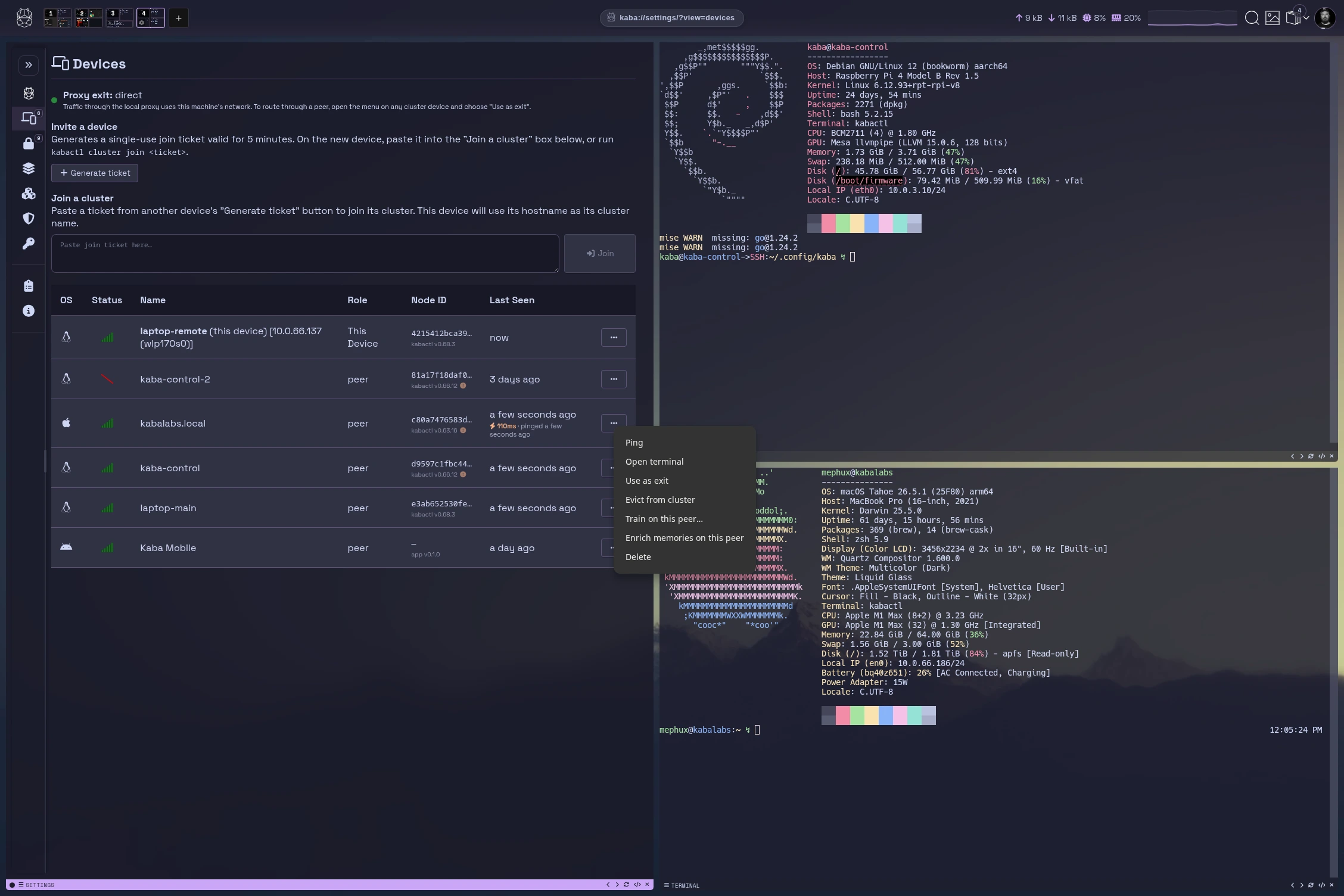
Every device you own joins one encrypted private network by default. No accounts with a third party, no cloud broker, no open ports.
Route through your peers
Send traffic through any peer as an exit node: your home connection from a café, or an office server from the road.
A terminal multiplexer
Splits, tabs, and sessions that persist, with a real shell on any peer in the mesh. Detach on one device, pick up on another.
Your devices in your pocket
Reach every machine you own from your phone, wherever you are.
Make it yours
Configuration files in the spirit of vim and i3, with an SDK on the way.
Control

You say yes. Or nothing happens.

Anything sensitive waits for your approval. Approve it and Kaba learns from your choice. Deny it and nothing leaves your machine.

Happy Kaba hippo
Approved
Sent, in policy, on the record.
Your choice trains the next version of your expert.
Angry Kaba hippo
Denied
Nothing left the sandbox.
The network stayed closed and your data stayed home.

Every device you own, in one place

See what’s online, set what each person’s devices can do, approve anything sensitive, and check what it all costs to run. It works the same for one laptop or a small office.

INTERACTIVE PREVIEW · SAMPLE DATA
Kaba · Your devices
Your devices Home mesh
kaba://mesh/?view={{ fc.view }}
▲ 7 online ⚑ {{ fc.pendingCount }} pending GPU 34%
AR
Sunday, November 1 · 09:42

Your devices

{{ k.label }} {{ k.value }} {{ k.note }}
Needs attention Last 24 hours
{{ a.title }}
{{ a.meta }}
{{ a.time }}
Places
{{ s.name }}{{ s.online }}
{{ s.meta }}

Access

Which people and devices can join your mesh. Every device proves who it is with its own key before it can connect.

Directory (optional) ● Home server · synced 6 min ago
People and groups Account → Kaba group
{{ g.dn }} → {{ g.group }} {{ g.users }}
Devices without a verified key are refused. Nothing is published to the public internet.

Devices 10

Search devices…
HostnameGroupHardwarePolicyStatusSeen
{{ d.host }}{{ d.user }}
{{ d.group }} {{ d.hw }} {{ d.policy }} {{ d.status }} {{ d.seen }}

Policies

Toggle a cell to assign a policy to a group. Changes are staged until you push.

{{ fc.stagedCount }} staged
Policy
{{ g.name }}{{ g.count }}
{{ row.name }} {{ row.desc }}
{{ pd.k }}
{{ it.k }}{{ it.v }}
Showing rules for {{ fc.selectedPolicyName }}. Devices pick up changes the next time they reach the mesh, with or without the internet.

Activity 6

What Kaba is working on across your devices. Adults can see the kids’ sessions; everyone else’s stay with the person who started them.

{{ c }}
{{ fc.sess.user }} · {{ fc.sess.title }} {{ fc.sess.meta }}
{{ fc.sess.stateLabel }}
{{ t.who }}
{{ t.text }}

Approvals

Anything sensitive waits here until someone says yes.

{{ r.sev }}
{{ r.file }} {{ r.rule }} {{ r.user }} · {{ r.time }}
{{ r.status }}
{{ fc.rev.file }} {{ fc.rev.user }} · {{ fc.rev.device }} · {{ fc.rev.direction }}
{{ fc.rev.status }}
{{ h }}
{{ ln.n }}{{ ln.pre }}{{ ln.hit }}{{ ln.post }}
History
{{ lg.t }}{{ lg.e }}

Cost

{{ k.label }} {{ k.value }} {{ k.note }}
Tokens per day
On-devicePeer
{{ fc.rangeStart }}Today
Spend by device
{{ sg.name }}{{ sg.amt }}
ModelDevicesRequestsp50 latencyp95Tokens/s
{{ m.name }} {{ m.devices }} {{ m.req }} {{ m.p50 }} {{ m.p95 }} {{ m.tps }}
≡ KABA · {{ fc.viewUpper }} POLICY v{{ fc.policyVersion }} · OFFLINE-READY · P2P ONLY
Names, sites and figures are illustrative.
Cost

What hosted services really cost.

For a household that uses AI and streaming every day, the monthly bill is only part of it.

Hosted AI and cloud services, per month
AI assistant, power-user plans × 2$200
API tokens for coding agents$100–400
Video streaming, two services, ad-free 4K$45
Video platform without ads, family plan$23
Music streaming, family plan$20
Office suite, family plan$13
Cloud storage, 2 TB$10
VPN or remote access$10
$420–720 a month
$5,000–8,600 a year, rising with every price change.
Kaba, per month
$0
Free and open source on computers you already own. No caps, no reset windows, no ads. Pair it with open-source apps like Jellyfin and your media plays at the quality you stored it. The ongoing cost is electricity.
A GPU desktop that serves the whole house costs less than one year of the bill on the left.
What the bill doesn’t show
You pay for the subscription, and the provider earns again from what it learns about you: ads, recommendations and models built from your data.
Usage caps
Plans limit how much you can use, then make you wait for a reset or pay for the next tier.
Paying for mistakes
Token billing charges for every attempt, including wrong answers and the retries to fix them.
Your files are scanned
Cloud storage providers scan what you upload to enforce their policies, and many analyze your photos to sort faces, places and objects.
Your taste is the product
Music and video services record what you play, skip and replay, then use it to target ads and decide what gets recommended and made.
Your home is listening
Smart speakers, cameras and home hubs record what your family says and how your household lives, and providers use it to improve their own services.
Your conversations train their models
Many consumer AI plans use your chats to train future models unless you find the setting and opt out.
Quality set by their costs
Streams drop resolution to save bandwidth and stop to ask if you’re still watching.
Ads and price rises
Cheaper tiers carry ads, and prices go up on the provider’s schedule, not yours.
Typical U.S. list prices, November 2026. Token spend varies with use.

How Kaba compares

Hosted assistants, local model runners and cloud office suites, compared on the features people use every day and on where that work happens.

Feature
Kaba
On your hardware
{{ c.name }}
{{ c.kind }}
{{ r.label }}
{{ v.note }}
{{ v.note }}
Compare Kaba with
Kaba
{{ cmpHOther }}
{{ r.label }}
{{ r.k.text }}
{{ r.o.text }}
Built in Partial or via add-ons Not offered or not documented Based on each product's public documentation, November 2026. Product names are trademarks of their owners.
Build your stack
Start with one laptop and add devices as you go.
Hardware tiers, a setup path, the services each piece replaces, and what happens when the internet goes down.
Build your stack →

Your hardware.
Your AI.

$ curl -fsSL https://kaba.ai/install.sh | sh

A team from GE CIRT and Mandiant R&D, led by the founder of Threat Stack (acquired by F5) and Critical Stack (acquired by Capital One), and co-founder of Kolide (acquired by 1Password).

Features

Be your own lab.

Your laptop, desktop, and home lab become one private intelligence that learns from how you work. Build datasets from your own context, train LoRA experts on your own hardware, and own every one of them. Local and encrypted by default.

your/research-notes.lora· owned by you your/code-review.lora· owned by you your/writing-voice.lora· owned by you
On this page {{ t.label }}

The client is the lab

The client docs ↗

Using models is now the norm. With Kaba, build datasets, train with RL, and turn telemetry into fuel. Be your own lab.

Full stack, end-to-end context — the reason the models get good.
No other tool, app, or model has your full context — just the prompts, or just the data within that app. Kaba's client encapsulates your flow across the entire stack, observing the ground truth of how, when, and why you work. Every observation stays local, encrypted at rest.
LoRA yours browser terminal files harness
Navigation
Navigation
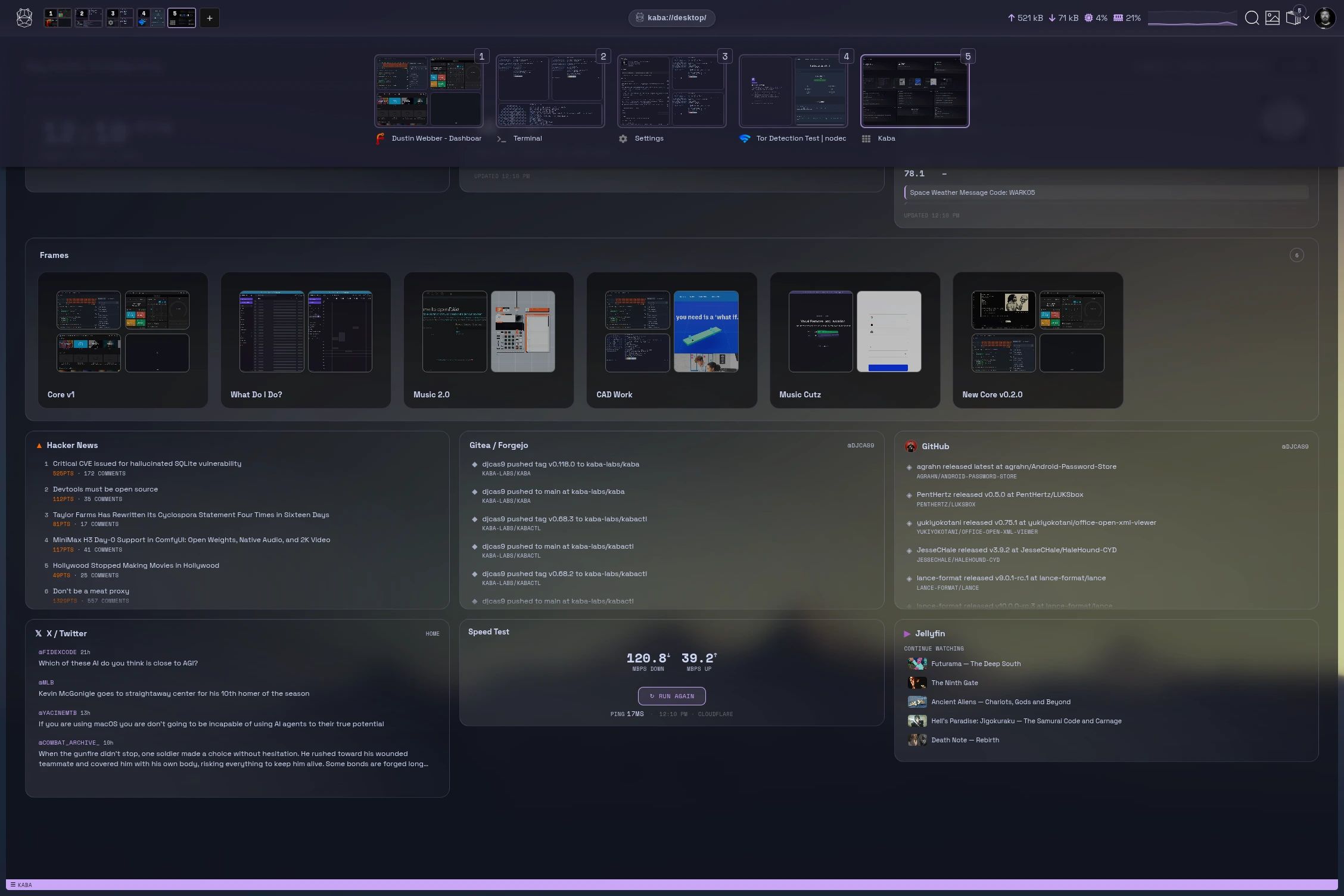
Every peer, model, memory, and run in one workspace. Jump back into frames where you left off.
Model harness
Model harness and lab
Chat, tool loops, and adapters over any local model. Every exchange becomes trajectory data that sharpens the next LoRA.
{{ tile.title }}
{{ tile.placeholder }}
{{ tile.tag }}
{{ tile.title }}
{{ tile.desc }}

How Kaba works

Protocols docs ↗
// THE MESH — peers, streams, tokens
laptop laptop.kaba gpu-tower gpu-tower.kaba k8s-node homelab.kaba phone phone.kaba tor egress kaba/infer/v1 kaba/train/v1 kaba/fs/v1 kaba/sync/v1 kaba/pty/v1
Every stream is an encrypted QUIC connection between peers you own — addressed by key-derived .kaba names over iroh, no DNS, no CA. Prompt goes out on kaba/infer/v1, tokens stream back. Anything that leaves the mesh can exit over Tor — and adapter selection is the peer's policy, the requester never chooses.
kabactl — zsh
$ kabactl cluster join --ticket kaba-intro
✓ gpu-tower joined · kaba/cluster/v1
$ kabactl infer --peer gpu-tower
▸ streaming tokens · kaba/infer/v1
$ kabactl train lora --dataset memories/
▸ checkpoint 3/12 · trajectory logged
▸ policy: local-only · encrypted at rest
// THE LEARNING LOOP — observe → memory → RL → adapter
observe attention memory memcrypt RL trajectory LoRA adapter yours, versioned
Memories are written autonomously from observed context, encrypted before rest. RL runs over memories and trajectories; the output is a LoRA adapter that is yours — sell, buy, trade, breed.
toolloop
// THE TOOL LOOP
01 prompt → plan 02 tool call → gVisor container 03 observe → checkpoint 04 parallel tasks → peer GPUs 05 hooks gate every edit

Marketplace — an open market for experts

Marketplace docs ↗
Every adapter you train is an expert. Experts are assets.
The LoRAs you build, the datasets you curate, the tools you design — list them, price them, sell or lease them. And because experts are composable, buyers don't just run yours: they breed it with their own — merging adapters into offspring with genuinely new capability.
rust-dev .lora · yours sec-audit .lora · leased offspring safe-rust.lora bred, versioned, yours to list
Experts for sale or lease
List a LoRA with its manifest and eval trail. Sell it outright or lease it by the epoch. Buyers verify provenance before a single token streams.
Datasets, policy-scrubbed
Curated training sets are built from your work and released only through the policy gate. What you sell is exactly what you chose to share.
Tools for the loop
Ship the tools you design for your experts — sandboxed, gVisor-contained, ready to drop into anyone's tool loop.
Breed for new capability
Combine experts — yours with bought, bought with leased. Merged adapters inherit from both lines; the offspring is a new asset you can list.

Mobile — your cluster in your pocket

Mobile docs ↗
All the benefits of the client in an on-the-go package. Never walk around with your laptop open again.
chatFull bi-directional conversations with any model on the cluster — pick a peer, pick an expert, talk.
remoteA remote for every peer in the mesh — see what's running, start and stop jobs from anywhere.
manageDevices and policies in your pocket — approve peers, edit rules, watch the mesh react live.

kabactl — the whole mesh from one prompt

Kabactl docs ↗
kabactl
Everything the client does, scriptable.
Join clusters, stream inference, push training jobs, inspect memories, edit policies — from any shell, over the same encrypted streams. Pipe it, cron it, put it in CI.
$ kabactl --help
cluster   join, leave, status, ticket
infer     stream tokens from any peer
train     lora build · push · import
mem       ls, show, forget — your memories
policy    edit the rules the mesh enforces
fs        browse and stream peer files
$
Composable
Reads stdin, writes JSON. Every command pipes into the next. Your mesh speaks Unix.
Peer-addressed
Target any device you own by name. LAN, tailnet, or across the world — the stream finds it and connects you directly.
Same rules apply
The CLI goes through the identical policy gate as the client. No backdoor, no service account, no exceptions.

How Kaba compares

Open-source harnesses and local AI tools, compared on what Kaba adds: memory from your own activity, training on it, policy on every step, and a private mesh across your devices.

Feature
Kaba
Harness and lab
{{ c.name }}
{{ c.kind }}
{{ r.label }}
{{ v.note }}
{{ v.note }}
Compare Kaba with
Kaba
{{ cmpPOther }}
{{ r.label }}
{{ r.k.text }}
{{ r.o.text }}
Built in Partial or via add-ons Not offered or not documented Based on each project's public documentation, October 2026. Product names are trademarks of their owners.
{{ qa.q }}
{{ qa.a }}

Your hardware. Your model.
Start training your attention.

KABA
Install in one line.
$ curl -fsSL https://kaba.ai/install.sh | sh
Download for {{ osLabel }} free · open source
Build your stack

Start with what you have.

Kaba turns the laptops, desktops, phones and spare machines you already own into one private system. It keeps working when the internet, a provider or the power goes down.

On this page {{ t.label }}

Hardware tiers

Every tier runs the same software. Adding a machine adds capacity; nothing has to be replaced.

One laptop
Personal setup
You need
Any recent laptop with 16 GB of memory. A GPU helps but isn’t required.
You get
·Chat, writing, research and a coding agent on small models
·Encrypted memory of your own work
·Works fully offline
Household
Shared across a home
You need
Add a desktop with a GPU and a storage box or spare PC. Phones and tablets join as they are.
You get
·Larger models served from the GPU to every device in the house
·Open-source apps like Jellyfin, Immich and Home Assistant for media, photos and the smart home, maintained by Kaba
·Kids’ devices with approvals for installs and exports
·Phones reach home from anywhere over direct connections
Small office
Shared across a team
You need
One or two GPU machines, a storage server, and everyone’s laptops. Branch sites join over the mesh.
You get
·Shared models with policies for each team
·Open-source office and file servers, kept patched and reachable only over your mesh
·Approvals for anything sensitive, with a full history
·Every device, person and cost in one view

Setup path

Install and pair your devices first. Moving services can happen gradually, alongside the tools you use today.

1
Install Kaba on one device
One binary for macOS, Windows or Linux. No account to create.
2
Add your other devices
Scan a code on each one. Devices exchange keys directly; there’s no cloud sign-in.
3
Choose your models
Download once and share across the mesh, or load them from a USB drive.
4
Self-host the rest
Pick open-source replacements like Jellyfin, Immich, Nextcloud and LibreOffice. Kaba installs them, keeps them updated and makes them reachable from all your devices.
5
Set policies and test offline
Decide what each person can do, then disconnect from the internet and confirm everything still works.

What each piece replaces

Kaba covers AI and the connections between your devices. For media, photos, files and documents, mature open-source apps already exist, and open-source rebuilds of paid desktop software are close behind. Run them on your own hardware and Kaba keeps them running and reachable from anywhere, without exposing them to the internet.

Kaba Projects
Instead of ChatGPT, Claude, Gemini, Copilot and hosted coding tools
Kaba research
Instead of Hosted search and research assistants
Kaba mesh
Instead of Cloud VPNs, port forwarding and remote-desktop services
JellyfinOpen source
Instead of Video and music streaming, for the movies, shows and music you own
ImmichOpen source
Instead of Google Photos and iCloud Photos
NextcloudOpen source
Instead of Google Drive, Dropbox and OneDrive
Home AssistantOpen source
Instead of Google Home, Apple Home and Amazon Alexa. Your lights, cameras, locks and voice commands stay inside your house.
LibreOfficeOpen source
Instead of Microsoft 365 and Google Docs, available today
BlenderOpen source
Instead of Cinema 4D and other paid 3D tools
Paid desktop software is next
With code this cheap to write, one-for-one open-source rebuilds of paid apps are arriving fast. The Craft Apps from the ArtCraft team are native, run on your own files and replace the tools people pay for every month. The same will happen to every paid app.
Part of KabaOpen-source app Kaba runs and maintainsProduct names are trademarks of their owners.
Kaba maintains them for you
Self-hosting used to mean updates, backups and fixing things at midnight. Kaba does that work 24/7, so your own apps stay up the way the big cloud services do.
Installs and configures
Pick an app and Kaba sets it up on the right machine, with storage and access already wired to your mesh.
Updates and patches
Security fixes and new versions are tested and applied as they ship, with a rollback if anything breaks.
Backs up and restores
Data is backed up to another device you own and checked so a restore actually works.
Watches around the clock
Kaba monitors every app, repairs what fails and tells you what it changed.

A mesh of your own devices

Devices find each other and connect directly over iroh, an encrypted peer-to-peer protocol. Every connection is verified by device key, so only your devices can join. Nothing is published to the public internet and no ports are opened on your router.

Home network gpu-towerGPU · serves modelsnas-basementJellyfin, Immich, filesana-thinkpadLaptopkids-ipadTabletoffice-miniOfficepixel-anaOn the roadpi-cabinCabin, on solar
Home devices, to each other
Local network. Works with the internet down.
Home ↔ office
Direct and encrypted, verified by device key.
Home ↔ phone on the road
Direct and encrypted from any network.
Home ↔ cabin
Through an encrypted relay when no direct path exists. The relay can’t read the traffic.
Local network, works offlineDirect encrypted connectionEncrypted relay you can run yourself

When things go wrong

If
The internet goes down
Then
Models, memory, chat and the self-hosted apps on your network keep working on every device at home.
If
A provider changes its terms or shuts down
Then
Nothing changes for you. The models, data and services are already on your hardware.
If
You’re away from home
Then
Your phone connects straight to home. With no signal at all, it works with what’s stored on it and syncs later.
If
The power goes out
Then
A laptop on battery runs a small model on its own. A solar-powered machine can keep a site running.
If
A device is lost or stolen
Then
Revoke its key from any other device. Its data is encrypted at rest and it can no longer join the mesh.
If
A web page contains hidden instructions
Then
Sensitive actions wait for approval, so injected instructions can’t send your files anywhere.
{{ qa.q }}
{{ qa.a }}

Install Kaba on your first device.

$ curl -fsSL https://kaba.ai/install.sh | sh
Download for {{ osLabel }}Free · open source · one binary

A team from GE CIRT and Mandiant R&D, led by the founder of Threat Stack (acquired by F5) and Critical Stack (acquired by Capital One), and co-founder of Kolide (acquired by 1Password).

Security & privacy

Your data stays on your devices, encrypted, in your account.

Kaba keeps each person's browsing, memories and AI work encrypted on their own device, in their own account, with nothing sent to a Kaba cloud. Each row below is what the code does today; the last section lists what is not done yet.

Encrypted on your device
Browsing, memories, passwords and AI files, each under a key only your password opens.
No Kaba cloud
No account server, no cloud AI, no telemetry. Your devices sync with each other directly.
Yours to destroy
Decoy passwords, panic wipe and remote wipe for the moments you lose control.
Encryption

Locked with a key only your password opens.

Everything you do in Kaba is encrypted on your device. The key exists in memory only while you are signed in.

How it works
Password-derived key slots
The account's data key is wrapped under a key the password derives with Argon2id: up to 512 MiB and as many passes as take about one second on that machine. No password hash is stored; the wrapped key is the only thing a password is checked against. Older accounts are re-wrapped at the current cost at their next sign-in.
Encrypted account database
History, site data, settings, frames, policies and other account tables are in an SQLCipher database per account, keyed from the data key.
Encrypted memories
The AI memory store (pages, notes, terminal and file sessions, calls) is encrypted per account: XChaCha20-Poly1305 in 16 KiB blocks. Its search index is kept in memory only, never written to disk.
Encrypted browser profile (Linux, macOS, Windows)
Cookies, site storage, cache, history, crash reports and every other Chromium file sit on an encrypted drive per account, opened at sign-in and closed at sign-out. Linux: a FUSE filesystem, XChaCha20-Poly1305 per 4 KiB block with sealed file names. macOS: an encrypted sparse disk image (AES-256, APFS). Windows: a WinFsp filesystem in the same format as Linux.
Sealed per-account files
Kaba's own files for an account (privacy choices per site, wallpapers, projects list, memory fingerprints, playbooks) are sealed with AES-256-GCM. A write without the person's key is refused rather than written in plain text.
Sealed AI files
Model adapters, training checkpoints, cloned voices, uploaded files and summary caches are sealed in the account's folder.
Nothing personal outside the account
Each account's data lives only in its own folder. The shared folder holds the accounts list, shared models and downloaded lists. Old plain copies from earlier versions are moved into the account or securely removed at sign-in.
Kept out of backups (macOS, Linux)
Kaba's folder is excluded from Time Machine, and marked with a CACHEDIR.TAG on Linux (borg, restic and tar honour it). Fewer copies of key material exist for anyone to attack.
Logs without personal data
Kaba's and kabactl's logs cut web addresses to the host and mask e-mail addresses.
No password hash to steal
Your password unwraps the key directly. There is nothing stored for an attacker to crack offline.
Memories stay sealed
What the AI remembers is encrypted in 16 KiB blocks, and its search index never touches the disk.
Your browser on its own encrypted drive
Cookies, cache and history live on a drive that opens at sign-in and closes at sign-out.
Fewer copies to attack
Kaba keeps its folder out of Time Machine and Linux backup tools.
Locking and emergencies

Gone in seconds when it has to be.

Kaba locks when you step away, and can destroy an account the moment you lose control of the device.

How it works
Automatic lock
Locks when the computer sleeps, when the screen locks, and after 15 minutes idle by default (1, 5, 10, 15, 30 or 60 minutes, or never). Optionally quits instead on sleep.
Lock in place (Linux (macOS and Windows restart to the lock screen instead))
The lock screen covers every window, the account's keys are dropped from memory, every page is unloaded, and the encrypted drive locks while still mounted. The drive refuses every other program and holds Kaba's own requests until unlock, so the browser's databases are never damaged.
Screen-capture shield (macOS, Windows)
Kaba's windows are hidden from screenshots, screen recording and screen sharing; the account screen always is. On by default.
Sign-in codes
Optional time-based codes (RFC 6238, any authenticator app) at sign-in and at the lock screen, with ten one-time recovery codes. The code secret is sealed under the account's key; only a hash of each recovery code is kept.
Decoy password
A second password that silently wipes the account and opens a new, empty one with the same name and picture. Both passwords are checked in parallel and always to the end, so a sign-in takes the same time with the real password, the decoy or a wrong one. Whether a decoy is set cannot be told from the database.
Wipe after failed sign-ins
Optional: wipe the account after a chosen number of wrong passwords in a row.
Panic wipe
A tray item and a keyboard shortcut per account (pressed twice, so one accidental press does nothing), and kabactl account wipe from a terminal.
Wipe reaches the person's other devices
A wipe on one device sends a command signed with the account's key to the person's other paired devices, which wipe that account too.
Fast, thorough wipe
Deleting the account's key slot makes every encrypted file unreadable at once; files are then removed in the background, and the few plain files are overwritten before removal.
Decoy password
A second password silently wipes the account and opens an empty one that looks the same. Sign-in takes the same time either way.
Panic wipe
A double-press shortcut or a tray item. Deleting the key makes every encrypted file unreadable at once.
Wipes reach your other devices
A signed command wipes the same account on every device you have paired.
Locked and hidden
Locks on sleep, screen lock or idle, and hides its windows from screenshots and screen sharing.
Tracking and fingerprinting

The web sees less of you, by default.

Every protection is on from the first launch and can be adjusted per site or per pane.

How it works
Ad and tracker blocking
Built-in blocker (Ghostery's engine) with EasyList, EasyPrivacy and the uBlock Origin lists (general, privacy, badware, resource abuse, annoyances, unbreak), anti-adblock lists, and a list that hides AI-generated images and sites in search results. Network and cosmetic filtering.
Fingerprint protection
Canvas, WebGL, audio and navigator values are slightly randomised per session (a new random seed every launch), so a fingerprint does not follow the person across sessions.
Clean browser identity
No Kaba or Electron marker in the User-Agent or client hints; high-entropy client hints (architecture, full version list, platform version, model) are not sent; headers keep Chrome's order so bot checks pass.
Third-party cookies blocked
With a per-site allow list and Storage Access API grants for sites that need them.
Cookie lifetime cap
Cookies expire after 180 days at most, as Safari and Brave do.
Tracking parameters stripped
utm_*, fbclid, gclid and similar are removed from links before the page loads.
Redirect-tracker bypass
Links through l.facebook.com, google.com/url and similar go straight to their destination.
HTTPS upgrade
Navigations try HTTPS first, falling back per host only when TLS fails.
Global Privacy Control
Sends Sec-GPC: 1 on every request.
WebRTC IP protection
Only the public address is used for WebRTC; local IPs are not exposed. Tor panes block non-proxied UDP entirely.
Lockdown (off by default)
Per site, per pane or everywhere: scripts off and the strictest fingerprint resistance (UTC time zone, letterboxed screen size, uniform voices).
Ghost Mode (off by default)
Per pane: an in-memory session with no disk cache. Nothing it visits is remembered, restored or kept after it closes.
Forget this site
Removes one site's cookies and storage on demand.
No focus stealing
A page cannot bring its pane or window forward with window.focus(); only the person's input can.
No sound before a click
Web pages cannot play audio until the person interacts with them.
Mixed content blocked
Insecure content on HTTPS pages is blocked unless allowed for that site.
Timer isolation
High-resolution timers and SharedArrayBuffer (a timing side channel) are available only to Kaba's own apps, never to the open web.
Ads and trackers blocked
Built-in blocking with the uBlock Origin and EasyList filters, plus a list that hides AI-generated results in search.
A new fingerprint every launch
Canvas, WebGL, audio and navigator values are randomised per session, so a fingerprint cannot follow you.
Clean links
Tracking parameters are stripped and redirect trackers are skipped before the page loads.
Lockdown and Ghost Mode
Turn scripts off with the strictest fingerprint resistance, or browse in a pane that keeps nothing.
Network privacy

Your traffic goes where you send it.

Every page passes through Kaba's local proxy, which encrypts DNS, checks threats on the device and can route through Tor.

How it works
Built-in Tor (off by default, per pane)
Any pane can be routed through Tor with one click (Arti, the Tor Project's Rust client, built in; no separate install). Each Tor pane gets its own circuit isolation, and Tor panes share a separate browser session kept in the account's encrypted drive. A "Connecting to Tor" page shows progress and what blocks it.
Encrypted DNS
Every name a pane reaches is resolved by Kaba's proxy over DNS-over-HTTPS (Cloudflare and Quad9). Default mode falls back to the system resolver only when DoH cannot be reached at all; strict mode never falls back; and "off" uses the system resolver, which can be the person's own DNS server.
Local threat protection
Domains are checked against threat-intelligence feeds maintained by security organizations, on by default and updated hourly: URLhaus malware hosts, Phishing Army, Feodo Tracker botnet servers, plus any feed or list the person adds. Unlike a live Safe Browsing lookup, no visited URL ever leaves the device.
Malware and phishing blocking in the blocker
URLhaus and phishing filter lists run inside the ad blocker, giving protection similar to Safe Browsing without a remote lookup.
Download checks
Downloads are checked by address and by file hash against the same local threat data.
Exit node through your own devices (off by default)
Browsing can leave from one of the person's own paired devices instead of this one, per account.
Per-account network settings
Each account's exit node and DNS mode are kept sealed in its own folder and applied when it signs in.
Certificate errors stop the page
A certificate error blocks the page; the person can allow that site once or remember the exception.
Tor in one click
Any pane can run through Tor, built in, with its own circuit and its own session.
Encrypted DNS
Names resolve over DNS-over-HTTPS, or through your own DNS server if you prefer.
Threat checks that stay local
Malware, phishing and botnet lists update hourly and are checked on the device. No visited URL leaves it.
Exit through your own devices
Browsing can leave from another device you own instead of the one you are using.
Passwords and passkeys

Your logins, in your vault.

Kaba has its own encrypted password manager and passkey provider, or works with the one you already use.

How it works
Built-in encrypted vault
Usernames, passwords and two-factor secrets are sealed field by field with the account's data key; nothing opens without the person signed in.
Use your own manager
The vault can be backed by pass (GPG password-store) or 1Password instead, each account in its own folder of the store.
Autofill by origin
Logins are offered only on the site they were saved for, and a changed password updates the saved login rather than adding a duplicate.
Two-factor codes
Stores TOTP secrets (SHA-1, SHA-256, SHA-512) and reads them from a QR code image.
Kaba as the passkey provider
Sites' passkey requests are answered by Kaba with its own consent dialog; the key lives in the vault and never leaves the main process. The origin is read from the requesting frame, never from what the page claims.
Hardware security keys
USB and NFC security keys keep working through the browser's own WebAuthn.
Passkey mode per person
Kaba provider, the browser's own implementation only, or WebAuthn off.
Sealed field by field
Passwords and two-factor secrets are encrypted with your account key.
Bring your own manager
Use pass or 1Password as the vault instead.
Passkeys handled by Kaba
Passkey requests get Kaba’s own consent dialog, and the origin is read from the frame, never from what the page claims.
Hardware keys work
USB and NFC security keys keep working as they do today.
Private AI and memory

AI that never leaves your hardware.

No prompt, page or memory goes to a cloud AI service. There is no built-in cloud provider at all.

How it works
On-device AI
The language model, embeddings, speech-to-text, OCR and image understanding run locally in kabactl. There is no built-in cloud AI provider.
Your own devices, not a cloud
When a device is too small, AI work can run on another of the person's own paired devices, end-to-end encrypted (see Your own devices).
Encrypted memories per account
Everything remembered (pages, terminal and Files sessions, external app sessions, calls, notes) is in the account's encrypted store; one account never sees another's.
Separate consent switches
Memory as a whole, and pages, terminal, Files activity, external apps, calls and learning data each on their own. Turning memory or AI off also stops what depends on it. kabactl checks the switch again on every write.
Never remembered
Sign-in pages, Ghost Mode panes, pages the AI agent is driving, and any site or address the person excluded.
Clear all
One action removes every memory of the account.
No telemetry to Kaba
Diagnostics stay in local logs; nothing is reported to a Kaba server.
On-device models
Language, embeddings, speech, OCR and image understanding all run locally.
A switch for everything
Memory, pages, terminal, files, apps and calls each have their own consent switch, checked on every write.
Some things are never remembered
Sign-in pages, Ghost Mode, pages the agent drives and anything you exclude.
No telemetry
Diagnostics stay in local logs. Nothing is reported to Kaba.
Accounts kept apart

One computer, several people, nothing shared.

Each person gets an account the others cannot read, like browser profiles with each one encrypted.

How it works
A process per account
Each signed-in account runs in its own browser process with its own Chromium profile, inside its own encrypted drive. Two accounts open at once share no cookies, storage, cache or memory.
A keyless account window
The window that lists accounts and signs people in has its own Chromium folder and holds nothing of any account.
Separate everything
Settings, wallpapers, open tabs, network settings (exit node, DNS mode), device pairings, password-store folder and AI data are each kept per account.
Lock and wipe per account
Each account locks on its own, and its panic shortcut wipes only that account.
Account list stays minimal
The shared database holds the accounts' sign-in material (key slots, the sealed account box) and this device's own records; history, settings and the rest live only in each account's encrypted database.
A process per account
Each account runs in its own browser process on its own encrypted drive.
Separate everything
Settings, tabs, network choices, pairings, passwords and AI data are kept per account.
Lock and wipe one account
Each account locks on its own, and its panic shortcut wipes only that account.
Your own devices

Your devices talk only to each other.

Sync happens directly between your devices, end-to-end encrypted. There is no Kaba account server and no cloud copy.

How it works
Peer-to-peer, end-to-end encrypted
Devices talk directly over QUIC (iroh). When a direct path is not possible, a relay forwards the already-encrypted traffic and cannot read it: public iroh relays by default, or the person's own relay set in kabactl.
Pairing per account
Each account pairs its own devices with a one-time ticket; one account's pairings cannot be used by another account on the same computer. Pairing keys are sealed in the account's folder.
Every request signed
Each request between devices is signed with the account's key and names the account by a one-way hash of its e-mail address, so a device keeps another person's requests out of this person's data.
Synced folder
Optional: the account's ~/Kaba/<e-mail>/ folder replicates between its own devices while it is signed in. Its files stay ordinary files on purpose, so the person's other apps can open them.
Remote wipe
A wipe on one device reaches the person's other devices (see Locking and emergencies).
Direct and encrypted
Devices connect peer to peer over iroh. If a relay is needed, it only forwards traffic it cannot read.
Every request signed
Each request between devices is signed with your account key.
A synced folder
Your Kaba folder replicates between your devices as ordinary files your other apps can open.

Compared with other browsers

Default settings on desktop, with no extensions added.

Protection
Kaba
Chrome
Safari
Firefox
Brave
Browsing data encrypted with your own password
Yes
Passwords and cookies, OS key
Relies on FileVault
Saved logins, with Primary Password
Passwords and cookies, OS key
Locks with its own password
Yes
No
Private windows only
No
No
Decoy password and panic wipe
Yes
No
No
No
No
Remote wipe across your devices
Yes
No
No
No
No
Ad blocking built in
Yes
No
No
No
Yes
Tracker blocking on by default
Yes
No
Yes
Yes
Yes
Third-party cookies blocked by default
Yes
No
Yes
Partitioned per site
Yes
Fingerprint randomisation
Yes
No
Limited
Known fingerprinters blocked
Yes
Built-in Tor
Per pane
No
No
No
Private windows
Global Privacy Control sent by default
Yes
No
No
Setting
Yes
Threat checks without sending URLs
Yes
Remote lookups
Remote lookups
Remote lookups
Remote lookups
Built-in AI runs on your hardware only
Yes
Mostly cloud
On-device and Apple cloud
Cloud chatbot providers
Cloud, or bring a local model
Sync with no vendor server
Peer-to-peer
Google account
iCloud
Mozilla servers, encrypted
Brave servers, encrypted
Open source
Yes
Chromium only
WebKit only
Yes
Yes
YesPartialNo

Your data.
Your devices.

About Kaba Labs

Security people who don't want to slow you down.

We've spent decades in enterprise security. We've also watched security teams become the reason new technology stalls.

We don't think that trade-off is necessary. You can move fast, understand your risk, and protect your data at the same time. Kaba is how we're proving it.

Our team has worked incident response at GE CIRT and done R&D at Mandiant. Our founder started Threat Stack, an early cloud and Linux security company built on deep syscall monitoring and acquired by F5, and Critical Stack, a secure Kubernetes platform acquired by Capital One, and co-founded Kolide, the endpoint monitoring company built with the team behind osquery and acquired by 1Password. Kaba is the latest of those, and not the last.

Based in
Boston, MA
Background
GE CIRT · Mandiant R&D · founder of Threat Stack (acquired by F5) and Critical Stack (acquired by Capital One), co-founder of Kolide (acquired by 1Password)
Building
The harness and lab for intelligence you own
COMING SOON
[click anywhere to close]
Screenshot
[click anywhere to close]